VPS backups & snapshots
How to protect and restore your data via the Fornex dashboard.
A Backup (Snapshot) is a point-in-time image of your entire VPS. It captures everything—system files, custom configurations, databases, and installed applications—allowing you to revert your server to a previous state instantly.
From your dashboard, you can:
- Schedule automated daily or weekly backups.
- Create manual snapshots on demand.
- Restore your server from a specific backup.
- Delete outdated copies to manage costs.
- Clone your VPS using an existing backup.
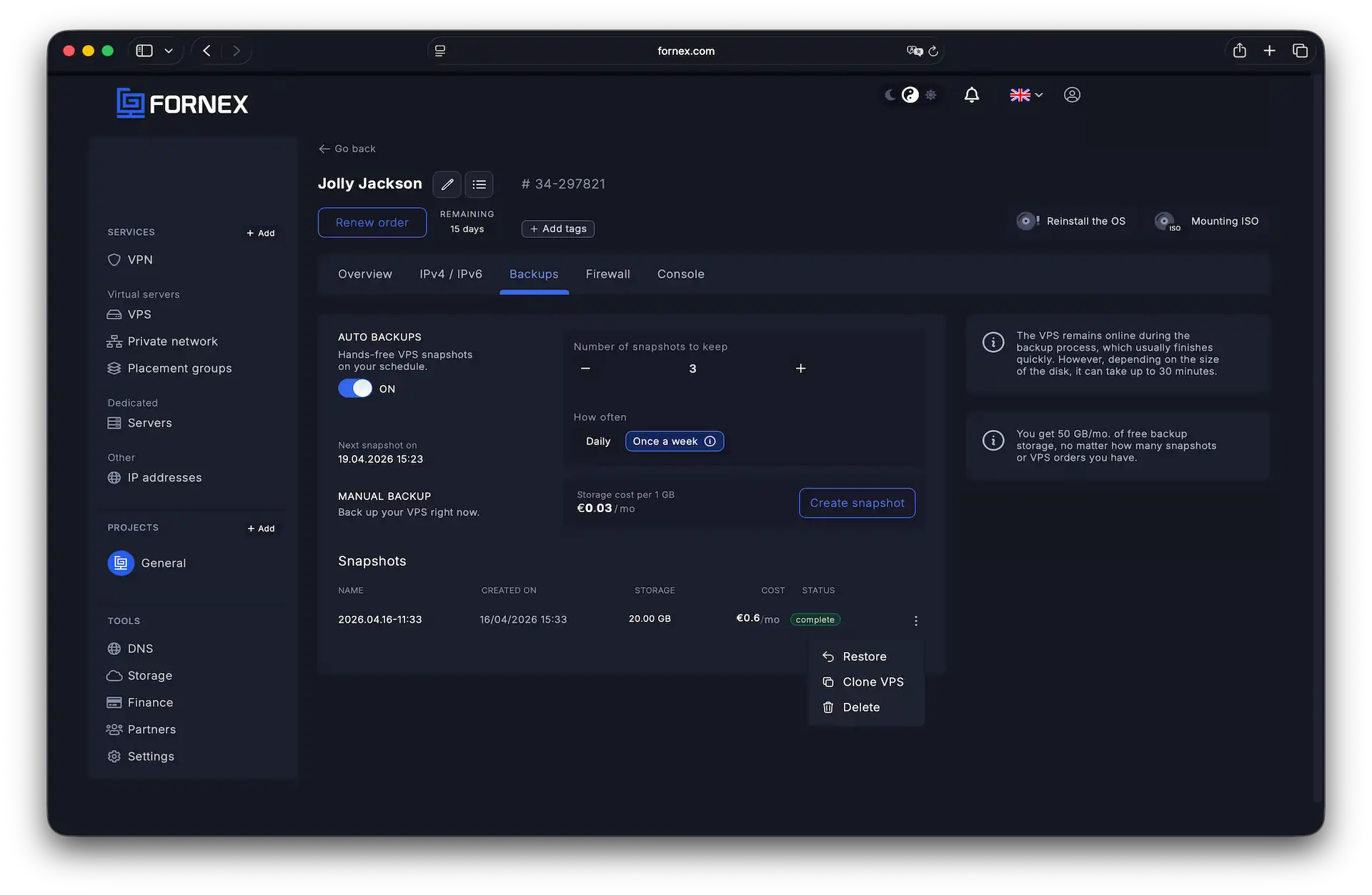 The backup management section in the dashboard
Automated scheduled backups
Enable the Scheduled option to automate your data protection. You have full control over:
- Frequency: choose between Daily or Weekly backups.
- Retention: set the number of copies to keep. Once the limit is reached, the oldest backup is automatically replaced by the newest one.
The system intelligently schedules these tasks (typically during low-traffic night hours) to minimize impact on server performance. You can see the estimated time for your next backup directly in the dashboard.
Manual snapshots
If you prefer not to use automation, you can click Create snapshot at any time. This is highly recommended before performing major system updates or configuration changes.
Restoring your data
Restoring from a backup will overwrite all current data on your server with the data from the chosen snapshot. Warning: Always create a fresh manual backup before restoring if you need to preserve any current files.
Pricing and storage limits
- Storage & metering: backups are stored on Fornex infrastructure. Usage is calculated daily based on the volume stored.
- Free tier: you get 50 GB per month for free. This quota is automatically deducted from your total usage.
- Excess usage: any storage beyond the free limit is billed at €0.03 per 1 GB per month.
Calculation examples
We calculate costs based on the average storage volume used throughout the month.
Example 1: Long-term storage of a single backup
- You store a 60 GB backup for 30 days.
- Total storage = 60 GB × 30 days = 1,800 GB-days.
- Free quota = 50 GB × 30 days = 1,500 GB-days.
- Billable volume = 1,800 − 1,500 = 300 GB-days.
- Total cost = 300 × (€0.03 / 30) ≈ €0.30 for the month.
Example 2: Short-term storage of a large backup
- You create a massive 1,500 GB backup but delete it after 1 day.
- Total storage = 1,500 GB × 1 day = 1,500 GB-days.
- Free quota = 1,500 GB-days.
- Billable volume = 0 GB-days.
- Total cost = €0. Even large snapshots are free if stored briefly.
Limits and calculations reset at the beginning of each month. Invoices for backup storage are issued monthly.
Important notes
- Processing time: the time required to create a backup depends on the size of your VPS disk.
- Data overwrite: restoring is a destructive process; your current server state will be completely replaced.
- Direct downloads: snapshots are system images for internal restoration and cannot be downloaded directly to a local computer.
Help
If you have any questions or need assistance, please contact us through the ticket system — we're always here to help!