Upgrading your dedicated server configuration
How to increase power by adding or upgrading hardware components.
If your current dedicated server setup no longer meets your needs, you can upgrade the hardware directly from your personal account — add a second CPU (if the server model supports it), increase RAM, or install additional drives (HDD/SSD/NVMe).
How to order an upgrade
- Log in to your dashboard → go to Dedicated Servers.
- Select the server you want to upgrade → open the Overview tab.
- In the hardware customization block, choose the changes you need:
- Add a second processor (only available on supported models)
- Increase RAM capacity
- Add new drives (HDD, SSD, or NVMe)
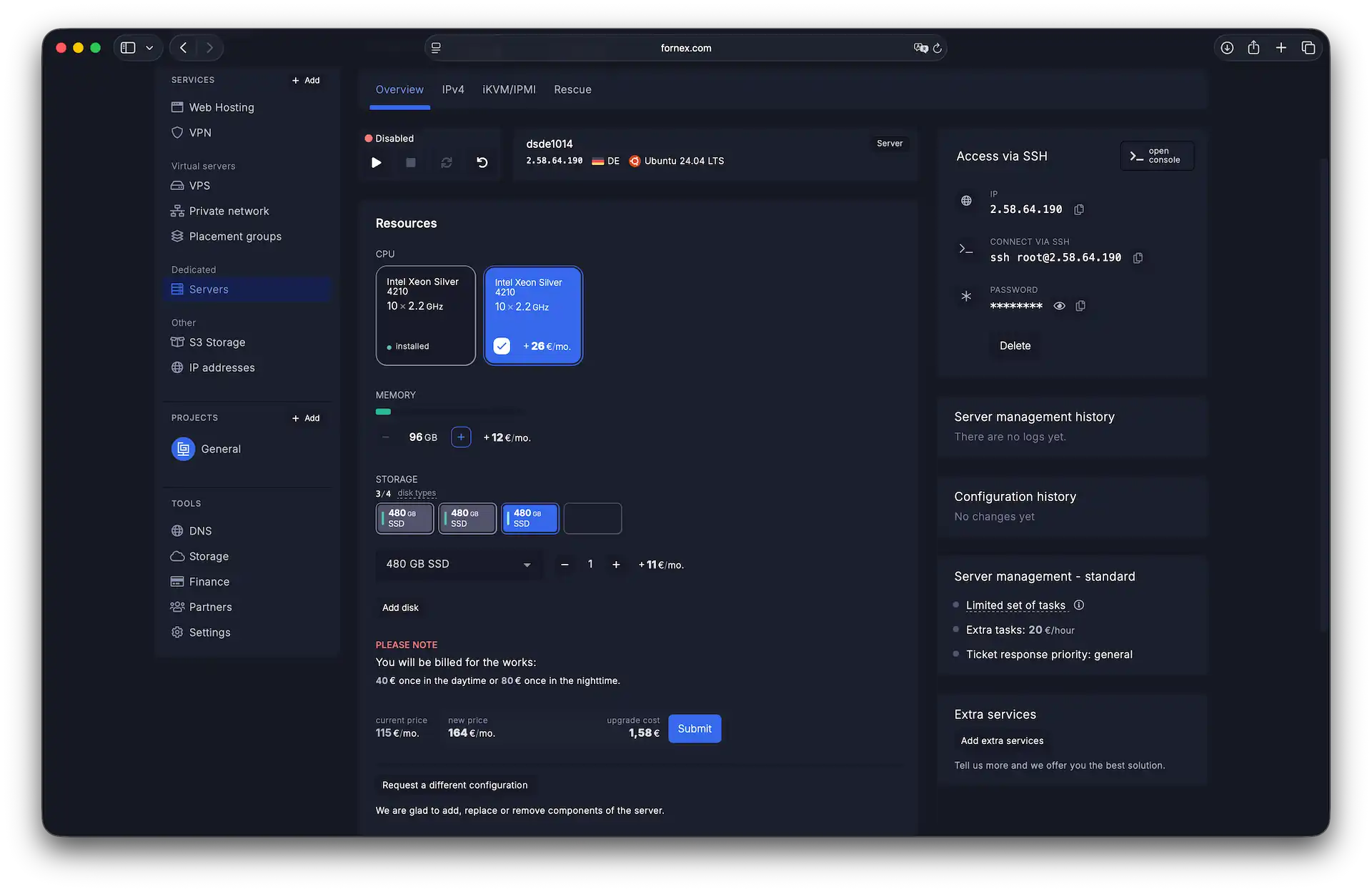 Selecting new components in the overview tab
- Once you've selected the desired options, click
Submit.
After confirmation, a ticket is automatically created in support. Our sales team will contact you to:
- Agree on the exact upgrade time and any brief downtime
- Confirm the final cost
- Discuss any specific requirements or preferences
Important notes
- The upgrade price is calculated proportionally for the remaining days of your current paid period.
- The upgrade is performed without data loss and without requiring OS reinstallation.
- Not all server models support a second CPU — available options are displayed automatically based on your hardware.
Help
If you have any questions or need assistance, please contact us through the ticket system — we're always here to help!