How to set up private networks for VPS
What are private (local) networks for VPS and how do they work?
Beta Mode
The service is currently in beta — we're actively developing and improving it.
We'll notify you by email about all important updates — keep an eye on your inbox from Fornex.
Private networks are a feature that allows you to connect multiple VPS servers in a single private network within one data center.
All traffic between the servers travels over a secure internal channel and does not go through the public internet.
This solution is ideal for tasks requiring high security and fast data exchange, such as:
- Building server clusters (e.g., for load balancing or high-availability systems).
- Database replication.
- Internal communication between backend, frontend, and other application components.
- Backup or data synchronization between servers.
Advantages of private networks
- Security: traffic stays within the data center, minimizing the risk of interception. No need for VPN or additional encryption for internal connections.
- Speed: internal channels provide low latency (usually <1 ms) and high bandwidth, depending on the configuration.
- Simplicity: setup is done directly in the Fornex dashboard at no extra cost. You can add any number of VPS servers to a single network.
- Optimization: reduces public traffic usage, which is beneficial for plans with traffic limits.
Important
Currently, the feature is supported in the following locations: Germany, Netherlands, and Sweden.
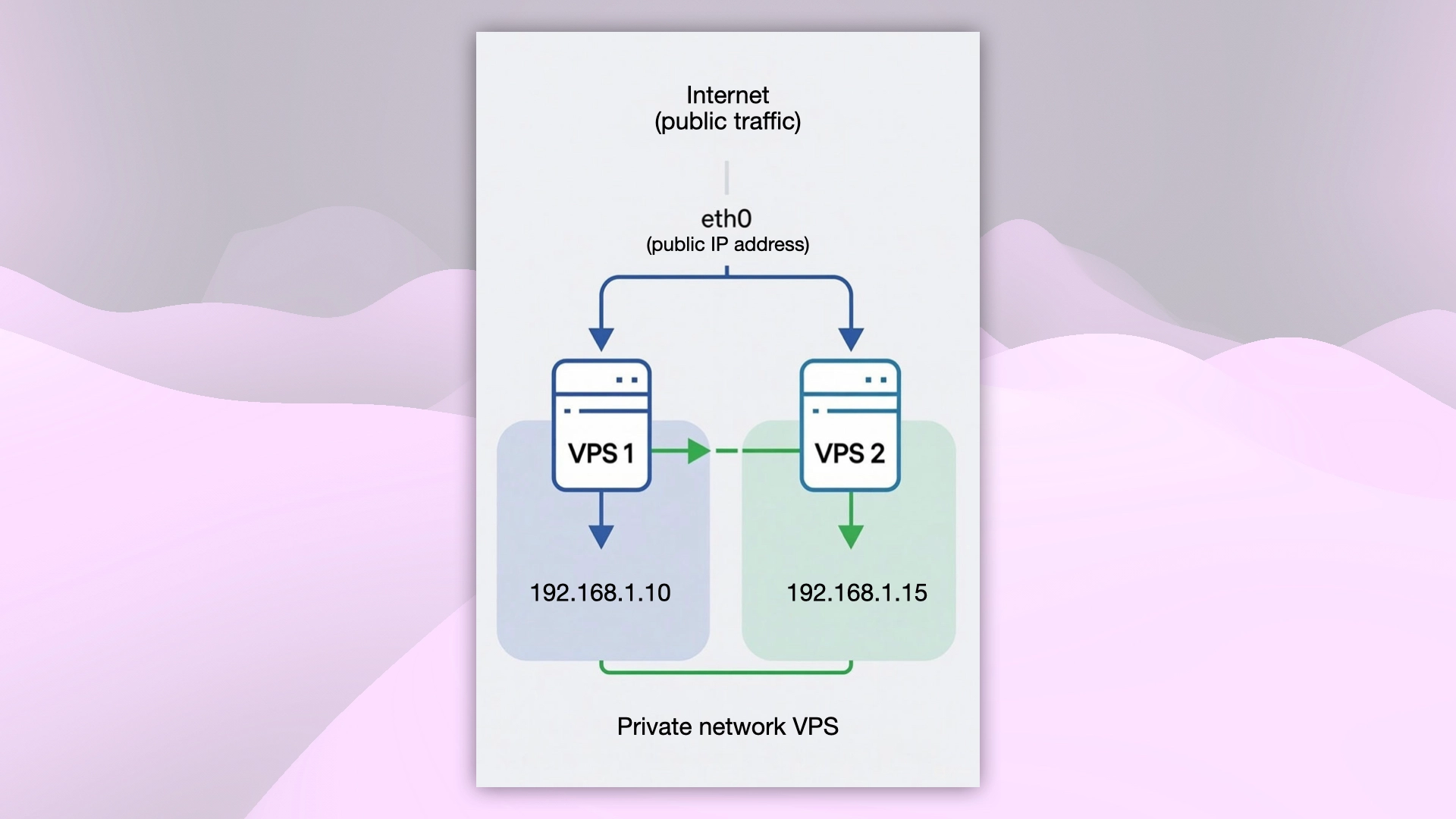 Private network VPS structure
Don't have a VPS yet?
Fornex offers VPS hosting with full root access, and 24/7 support. Get a stable server with NVMe disks for fast and reliable operation. Find more details on the Fornex VPS page.
How private networks work in Fornex
-
Activate the network in the dashboard
Go to Virtual servers → Private networks in the sidebar menu.
Create a new network and add the required VPS instances (all must be in the same location). -
Configure private IP addresses on the servers
Manually assign private IPs using your OS configuration files or tools.
See detailed instructions for your operating system:
Configure the private network for different OS → -
Start communicating privately
Once configured, servers can reach each other using their private IPs.
All external (internet) traffic continues to go through the primary public interface.
Important
Private networks are available only for VPS located in the same location (one data center).
You need at least two active VPS to activate a private network.
Why a private network might be unavailable and what to do
In rare cases, the feature may not be displayed or may not work due to technical reasons:
-
Server location: Private networks are only supported in the locations Germany, Netherlands, and Sweden.
Solution: order a new VPS in one of these locations — the feature will be available automatically. -
Hypervisor type: Some hypervisors may not support private networks.
Solution: create a ticket with technical support and request to migrate the server to a compatible hypervisor. -
Fewer than two VPS in the network: If only one active VPS remains in the private network (e.g., the second one was deleted or moved to another location), the network is considered unused and may be automatically disabled after some time.
Solution: add at least one additional VPS to this network in your dashboard.
Configure the private network for different OS
After activating the network in the dashboard, proceed to configure the interface on your servers.
Choose the guide for your OS:
- Setup on Ubuntu 22.04/24.04
- Setup on Debian 11/12/13
- Setup on CentOS 8/9, AlmaLinux, Rocky Linux
- Setup on Windows
Help
If you have any questions or need assistance, please contact us through the ticket system — we're always here to help!