The chown utility
How to change file and directory ownership using chown.
chown is a utility for changing the owner and/or group of specified files. If only a username is provided, that user becomes the owner and the group remains unchanged. If a group is specified after a colon, both the owner and the group are updated.
Viewing owner and group
To view file and directory details:
ls -lFor a specific file:
ls -l file.php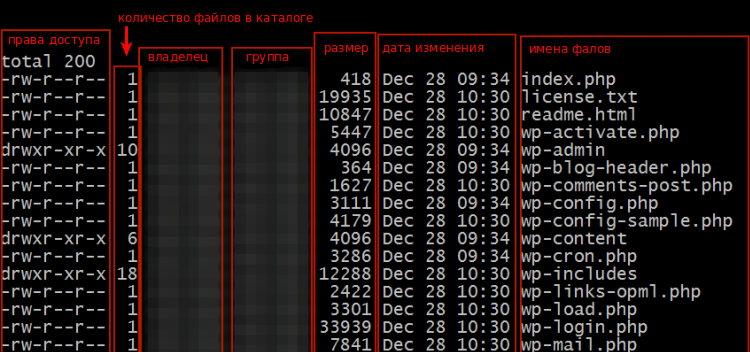 ls -l output in the WordPress root directory
The owner and group are shown in the 3rd and 4th columns of the output.
Syntax
chown [-cfhvR] [--dereference] [--reference=rfile] user[:group] file…Key options:
-c,--changes— report only files whose ownership actually changed.-f,--silent,--quiet— suppress error messages for files whose ownership cannot be changed.-h,--no-dereference— affect symbolic links themselves rather than the files they point to.-R,--recursive— recursively change ownership of directories and their contents.-v,--verbose— describe the action taken for each file.--dereference— change the owner of the file a symbolic link points to, not the link itself.--reference=rfile— set the owner to match that ofrfile.
Example
To recursively change the owner and group of a website directory at /var/www/example.com:
cd /var/www
chown -Rv example:example example.com
The first command navigates to the target directory, the second recursively updates the owner and group for the directory and all its contents.
Help
If you have any questions or need assistance, please contact us through the ticket system — we're always here to help!