Connecting to S3 storage using AWS CLI
How to install AWS CLI and connect to S3 storage.
S3 storage is an object storage service for storing any kind of digital data — documents, images, videos, archives, and more. Data is accessed via an HTTP/HTTPS API using unique URLs. Unlike traditional file systems, data is stored as independent objects with unique keys and metadata, rather than as files in a folder hierarchy.
Installing AWS CLI
To install on Linux, run:
curl "https://awscli.amazonaws.com/awscli-exe-linux-x86_64.zip" -o "awscliv2.zip"
unzip awscliv2.zip
sudo ./aws/install
Verify the installation:
aws --versionExpected output:
aws-cli/2.27.45 Python/3.13.4 Linux/5.15.0-140-generic exe/x86_64.ubuntu.22For installation instructions on Windows and macOS, see the official documentation.
Configuring the connection
Your storage access keys are available in the dashboard of your order.
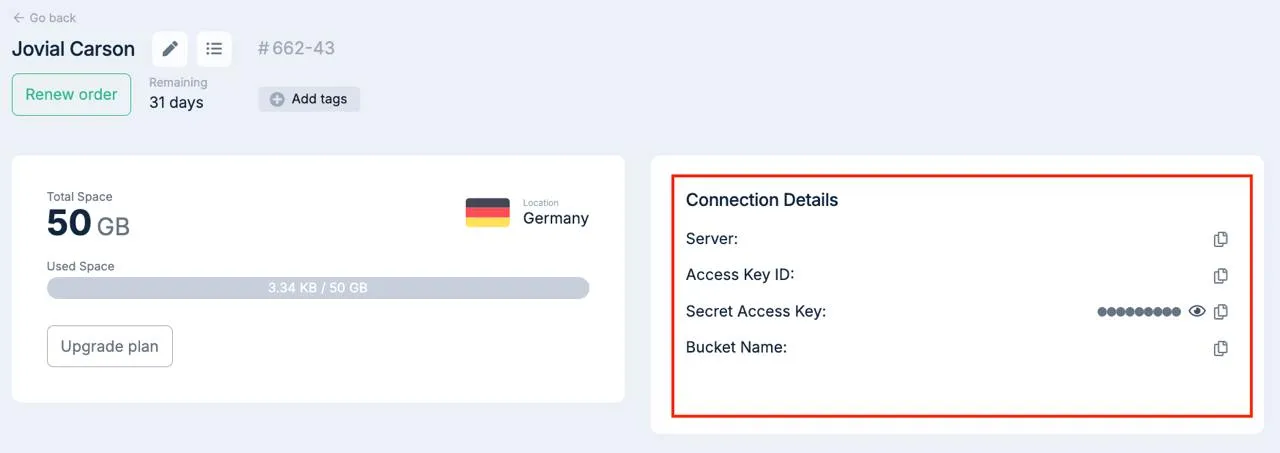 Access keys in dashboard
Run the configuration wizard:
aws configureEnter the following:
AWS Access Key ID— your access key ID.AWS Secret Access Key— your secret key.Default region name— the region where your bucket is located, e.g.us-east-1(optional).Default output format—jsonis recommended, or leave blank for the default.
Credentials are saved to
~/.aws/credentials, configuration to~/.aws/config.
Add the storage endpoint to ~/.aws/config:
# replace s3-storage-host with the server name from your order dashboard
[default]
endpoint_url = https://s3-storage-host
s3 =
  addressing_type = virtual
The connection is now configured.
Common commands
List objects in a bucket:
aws s3 ls s3://bucket-nameCopy a local file to a bucket:
aws s3 cp local_file s3://bucket-nameDownload a file from storage to your local machine:
aws s3 cp s3://bucket-name/file /path/to/local/directorySync a local directory with a bucket:
aws s3 sync local_directory/ s3://bucket-nameDelete an object from storage:
aws s3 rm s3://bucket-name/fileGenerate a temporary public link to a file:
aws s3 presign s3://bucket-name/file --expires-in time_in_secondsFor command reference, use
aws s3 help.
Help
If you have any questions or need assistance, please contact us through the ticket system — we're always here to help!