Linux Malware Detect overview
How to install and use the Linux Malware Detect scanner.
Linux Malware Detect (Maldet) is a malware scanner for Linux servers. It detects suspicious and malicious scripts — shells, spam mailers, and similar threats — both system-wide and within specific directories like website files.
Key features:
- detecting suspicious files;
- quarantining problematic files;
- attempting automatic cleanup of infected files;
- scanning only files created or modified within a given time window;
- real-time monitoring of a directory in interactive mode;
- managing exceptions by signature, path, or individual file;
- submitting suspicious files to Maldet's analysis servers;
- automatic and manual updates of signatures and the scanner itself.
Installation
The installation process is the same for CentOS and Debian:
cd /root
wget http://www.rfxn.com/downloads/maldetect-current.tar.gz Downloading Maldet
tar -zxvf maldetect-current.tar.gz
cd maldetect-*/
bash install.sh
The install script places the executable at /usr/local/maldetect/maldet and creates a symlink at /usr/local/sbin/maldet. It also creates /usr/lib/libinotifytools.so.0 and sets up a daily cron job at /etc/cron.daily/maldet.
Usage
Scan files modified in the last 5 days:
maldet -r / 5When the scan finishes, Maldet prints a summary showing the total number of files scanned, infections found, and files cleaned, along with a report ID.
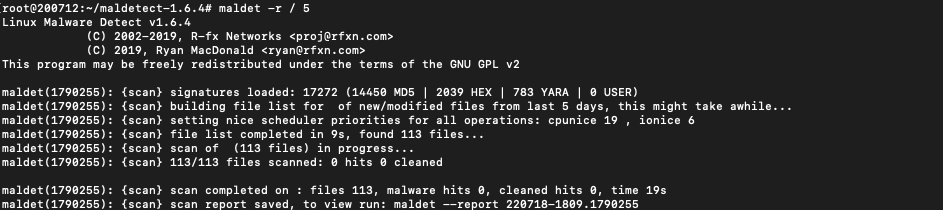 Scan results
View a report:
maldet --report 220718-1809.1790255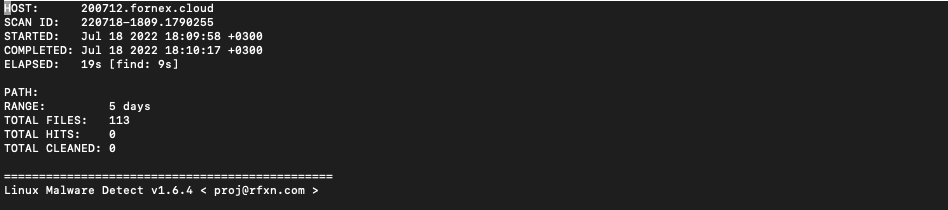 Maldet report
Update signature database:
maldet -uMove infected files to quarantine (stored in /usr/local/maldetect/quarantine):
maldet -q 220718-1809.1890277Restore files from quarantine:
maldet -s 220718-1809.1890277Attempt to clean malicious code from infected files:
maldet -n 220718-1809.1890277Add a malicious file to the signature database:
maldet -c badfile.phpConfiguration
The Maldet configuration file is located at /usr/local/maldetect/conf.maldet.
Key parameters:
# [ General options ]
email_alert="1"                # Enable email notifications
email_addr="mail@example.com"  # Address to receive notifications
email_ignore_clean="0"         # Notify about cleaned files (0 = don't notify)

# [ Scan options ]
scan_max_depth="15"            # Maximum scan depth
scan_min_filesize="24"         # Minimum file size in bytes
scan_max_filesize="2048k"      # Maximum file size to scan
scan_clamscan="1"              # Use ClamAV if installed
scan_tmpdir_paths="/tmp /var/tmp /dev/shm /var/fcgi_ipc"  # Temp dirs to scan
scan_user_access="0"           # Allow non-root users to run scans
scan_ignore_user=""            # Users to skip during scanning
scan_ignore_group=""           # Groups to skip during scanning

# [ Quarantine options ]
quarantine_hits="1"            # Automatically quarantine detected files
quarantine_clean="0"           # Attempt automatic cleanup of infected files
Daily scanning
During installation, Maldet creates /etc/cron.daily/maldet, which runs a daily scan of new files on the server. Anything found is handled according to the configuration file settings.
If daily scanning isn't needed, simply delete that file. The paths in it already cover standard server control panel layouts — manual edits are only necessary if non-standard directories need to be included.
Help
If you have any questions or need assistance, please contact us through the ticket system — we're always here to help!