KYC account verification
When identity verification is required and how to complete it.
KYC (Know Your Customer) is a standard identity verification process used throughout the online industry. It confirms the authenticity of your profile data and is essential for:
- Comply with international legal requirements and industry security standards
- Protect your account from unauthorized access
- Prevent fraudulent activities
- Maintain the overall safety and integrity of the platform
In accordance with our Terms of Service, Fornex reserves the right to request identity verification and requires you to provide complete and accurate information about the account owner.
When verification may be required
Verification can be triggered in the following cases:
- Certain payment methods — Some payment systems require mandatory identity verification before processing transactions.
- Violation of Terms of Service — In cases of serious breaches of our Terms of Service.
- Abuse reports — When we receive complaints involving outgoing spam, DDoS attacks, fraudulent activity, copyright violations (DMCA), or similar incidents.
- Suspicious or inaccurate profile data — If the system detects potentially false information combined with unusual account activity.
From Terms of Service
Upon request, you must provide full and accurate personal and contact information in accordance with EU legislation. If we have reasonable doubts about the authenticity of the provided data, Fornex may suspend services until proper supporting documents are received.
When we may request account verification
- During payment processing — The system may trigger verification if the selected payment method requires payer identification.
- When updating profile information — Changes to your personal details may require additional confirmation.
- Direct request from support — As part of security investigations or when resolving technical tickets.
How to complete verification
To verify your identity, you need to provide a selfie with your ID document. Please note: simple scans or photos of documents without you holding them will not be accepted.
- Selfie with original document — A clear photo where you are holding your passport, national ID card, or driver's license. The support ticket page must be clearly visible on a monitor or tablet in the background.
Selfie recommendations
- Your face must be fully visible and well-lit.
- All information on the document must be clearly readable.
- The ticket screen in the background must be in focus and easy to see.
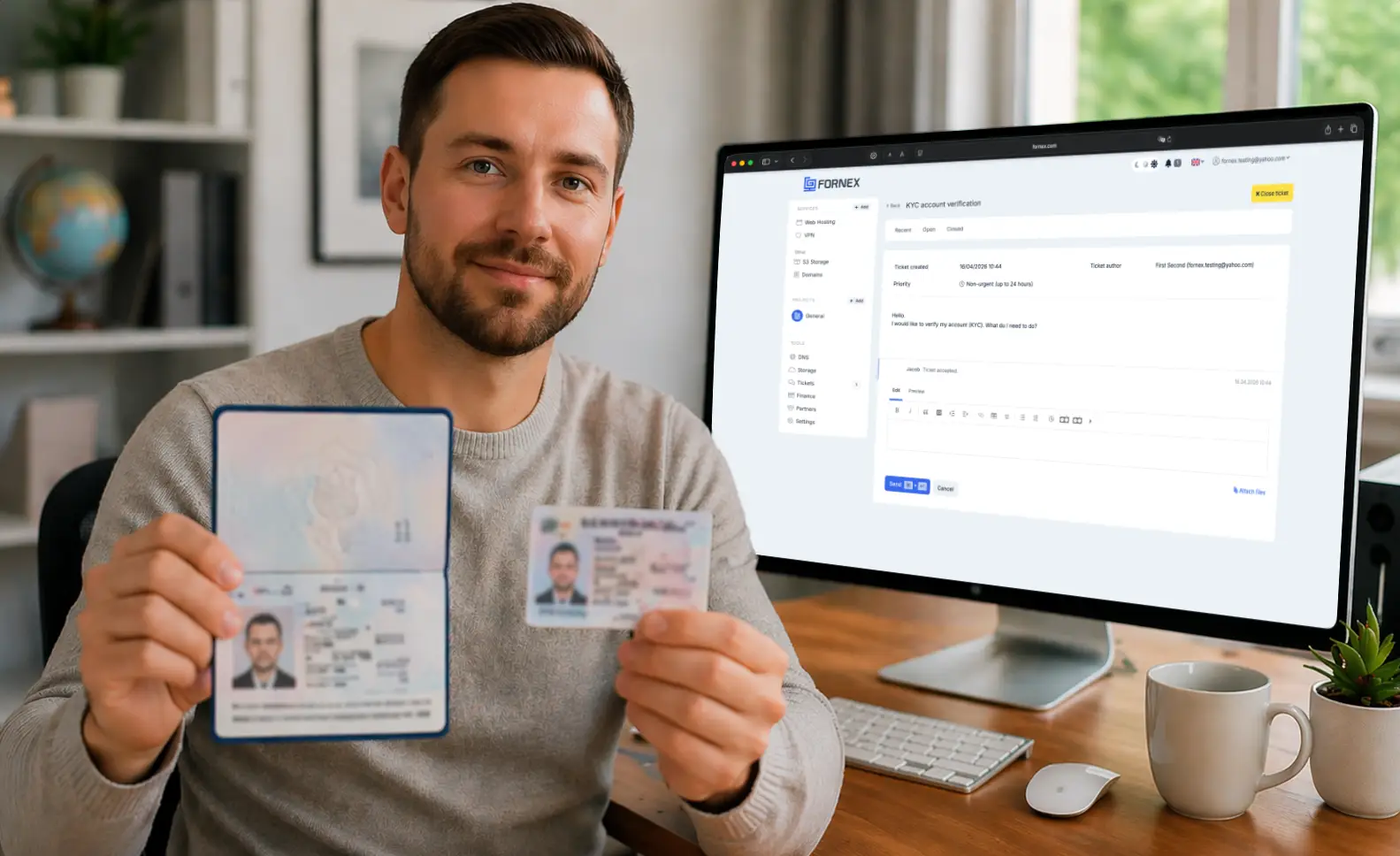 Sample selfie
Ways to submit your documents
Option 1: Automatic request during payment
If the chosen payment method requires verification, you will see a Verify Account button in the payment interface. Clicking it will automatically create a support ticket with a pre-filled form — you just need to attach your selfie.
Option 2: Create a ticket manually
If you want to complete verification in advance:
- Go to the new ticket creation page.
- In the Subject field, enter “Identity Verification”.
- Click
Attach filesand upload your prepared selfie. - Click
Send.
Processing time:
Document verification usually takes about 5 minutes (standard ticket processing time). You will receive a reply in the same ticket with the result — either successful verification or a request to resubmit the photo with specific feedback.
Frequently Asked Questions
Why is verification required?
This is a standard security measure required by international legislation. It helps protect the platform from abuse and ensures the safety of your payments and data.
Will my account be blocked?
No, your account will not be blocked. You can continue using our services, though some actions (such as paying invoices with certain methods or creating new orders) may be temporarily limited until verification is completed.
What if my document is rejected?
You will receive a detailed explanation in the ticket reply. Common reasons include poor photo quality, unreadable data, or missing selfie elements. Simply upload a new photo addressing the feedback in the same ticket.
Are my data secure?
Yes. All documents are processed in full compliance with the GDPR. Your information is never shared with third parties and is used solely for identity verification purposes.
How long is the verification valid?
Once completed, verification remains valid. However, if you make significant changes to your personal information in the profile, we may request re-verification in accordance with our Terms of Service.
Help
If you have any questions or need assistance, please contact us through the ticket system — we're always here to help!