Disabling open_basedir in Hestia CP
How to turn off the open_basedir restriction for a specific site.
Hestia CP is one of the most popular and user-friendly hosting control panels around. It handles everything from websites and email to databases, SSL certificates, file management, and scheduled tasks.
What is open_basedir and why would you disable it?
The open_basedir directive restricts PHP scripts to only accessing files within their own site's root directory. It's a sensible security measure that keeps sites isolated from one another — each one can only see its own files and can't interfere with anything else on the server.
That said, it occasionally gets in the way. Some scripts legitimately need to reach files outside the site root, and when open_basedir blocks them, you'll see an error like this in your logs or on the page itself:
open_basedir restriction in effectWhen that happens, you can disable the restriction for the affected site without touching the rest of your setup.
Disabling open_basedir
PHP-FPM template files are stored here:
/usr/local/hestia/data/templates/web/php-fpm/Each file corresponds to a specific PHP version. For PHP 8.0, for example, the template is named PHP-8_0.tpl.
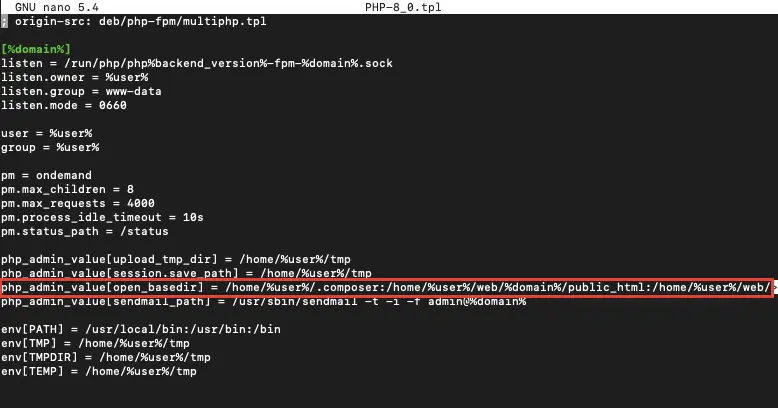 PHP-FPM template files in Hestia CP
Open the template for your PHP version and find this line:
php_admin_value[open_basedir] = ...Comment it out by adding a semicolon at the beginning:
;php_admin_value[open_basedir] = ...You can do this manually in any text editor (nano, vim) — or just run the command below to have it done automatically.
Make sure to update the filename if you're on a different PHP version. The example below targets PHP 8.0.
sed -i 's/php_admin_value\[open_basedir\]/;php_admin_value\[open_basedir\]/g' /usr/local/hestia/data/templates/web/php-fpm/PHP-8_0.tplIf you edited the file manually, save it with Ctrl + O → Enter → Ctrl + X.
Applying the changes
Once the template is updated, you need to push the changes to the site and reload PHP. Run the command below, substituting your own values for the three parameters:
admin— the Hestia CP username the site belongs toexample.com— your site's domainPHP-8_0— the name of the template you just edited
v-change-web-domain-backend-tpl admin example.com PHP-8_0Verifying the result
Check that open_basedir is no longer active by generating a phpinfo() page on your site.
Here's what it looks like when the restriction is enabled:
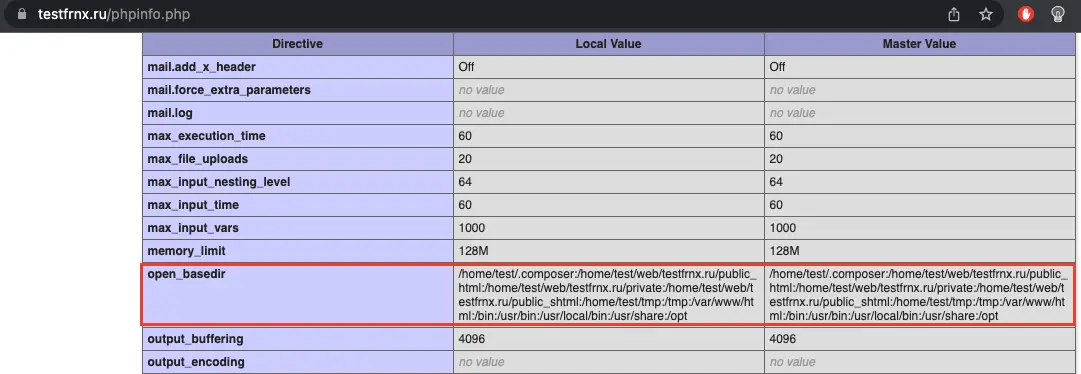 open_basedir enabled
And here's what you should see when it's disabled:
 open_basedir disabled
Help
If you have any questions or need assistance, please contact us through the ticket system — we're always here to help!