Installing ionCube Loader in Hestia CP
How to set up ionCube Loader support for your sites and applications.
Hestia CP is one of the most popular and user-friendly hosting control panels around. It covers everything from managing websites, email, and databases to SSL certificates, file management, and task scheduling — all from a clean, straightforward interface.
Before you begin
Make sure you have a recent backup of your server.
Downloading the ionCube archive
Connect to your server via SSH and run the following command. It will switch to the /home directory, download the ionCube archive, extract it, and list its contents:
cd /home; wget downloads.ioncube.com/loader_downloads/ioncube_loaders_lin_x86-64.zip; unzip ioncube_loaders_lin_x86-64.zip; cd ioncube/; ls -lh You'll see output similar to this:
cd /home; wget downloads.ioncube.com/loader_downloads/ioncube_loaders_lin_x86-64.zip; unzip ioncube_loaders_lin_x86-64.zip; cd ioncube/; ls -lh
--2023-02-24 16:20:22-- http://downloads.ioncube.com/loader_downloads/ioncube_loaders_lin_x86-64.zip
Resolving downloads.ioncube.com (downloads.ioncube.com)... 192.241.136.243
Connecting to downloads.ioncube.com (downloads.ioncube.com)|192.241.136.243|:80... connected.
HTTP request sent, waiting for response... 200 OK
Length: 14635181 (14M) [application/zip]
Saving to: 'ioncube_loaders_lin_x86-64.zip.2'

ioncube_loaders_lin_x86-64. 100%[===========================================>] 13.96M 422KB/s in 19s

2023-02-24 16:20:42 (745 KB/s) - 'ioncube_loaders_lin_x86-64.zip.2' saved [14635181/14635181]

Archive: ioncube_loaders_lin_x86-64.zip

replace ioncube/ioncube_loader_lin_5.0.so? [y]es, [n]o, [A]ll, [N]one, [r]ename: All
  inflating: ioncube/ioncube_loader_lin_5.0.so
  inflating: ioncube/ioncube_loader_lin_4.3.so
  inflating: ioncube/ioncube_loader_lin_7.0_ts.so
  inflating: ioncube/ioncube_loader_lin_4.2.so
  inflating: ioncube/ioncube_loader_lin_5.6.so
  inflating: ioncube/ioncube_loader_lin_7.1.so
  inflating: ioncube/ioncube_loader_lin_5.3.so
  inflating: ioncube/ioncube_loader_lin_7.3_ts.so
  inflating: ioncube/ioncube_loader_lin_5.5_ts.so
  inflating: ioncube/ioncube_loader_lin_5.4.so
  inflating: ioncube/loader-wizard.php
  inflating: ioncube/ioncube_loader_lin_4.3_ts.so
  inflating: ioncube/ioncube_loader_lin_5.5.so
  inflating: ioncube/LICENSE.txt
  inflating: ioncube/USER-GUIDE.pdf
  inflating: ioncube/ioncube_loader_lin_5.4_ts.so
  inflating: ioncube/ioncube_loader_lin_7.4_ts.so
  inflating: ioncube/ioncube_loader_lin_7.0.so
  inflating: ioncube/ioncube_loader_lin_5.3_ts.so
  inflating: ioncube/ioncube_loader_lin_4.4.so
  inflating: ioncube/ioncube_loader_lin_4.4_ts.so
  inflating: ioncube/ioncube_loader_lin_7.4.so
  inflating: ioncube/ioncube_loader_lin_7.3.so
ionCube Loader must be installed separately for each PHP version on your server. The examples below use PHP 7.4 — replace it with your actual version wherever it appears.
Finding the extensions directory
Run this command to find out where your PHP extensions live:
php7.4 -i | grep "PHP Extension"Copying the loader file
Copy the ionCube loader file into your PHP extensions directory. Adjust the PHP version and path to match your setup:
cp ioncube_loader_lin_7.4.so /usr/lib/php/20190902Creating the config file
Create a 00-ioncube.ini file in the PHP-FPM config directory for your version:
echo zend_extension=ioncube_loader_lin_7.4.so > /etc/php/7.4/fpm/conf.d/00-ioncube.iniOptionally — if you need ionCube to work in the CLI version of PHP as well, create the same file in the CLI config directory:
echo zend_extension=ioncube_loader_lin_7.4.so > /etc/php/7.4/cli/conf.d/00-ioncube.iniRestarting PHP
Restart the PHP-FPM service for your version:
service php7.4-fpm restartVerifying the installation
Check that the module loaded correctly using a phpinfo() script:
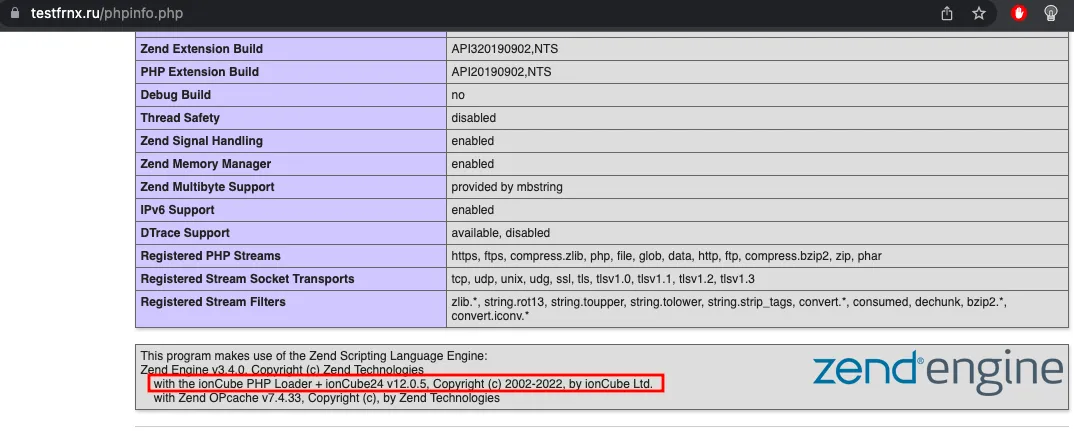 Verifying ionCube Loader via phpinfo
Or check directly from the terminal:
php7.4 -vIf everything went smoothly, you'll see ionCube mentioned in the output:
PHP 7.4.33 (cli) (built: Feb 14 2023 18:01:29) ( NTS )
Copyright (c) The PHP Group
Zend Engine v3.4.0, Copyright (c) Zend Technologies
    with the ionCube PHP Loader + ionCube24 v12.0.5, Copyright (c) 2002-2022, by ionCube Ltd.
    with Zend OPcache v7.4.33, Copyright (c), by Zend Technologies
Help
If you have any questions or need assistance, please contact us through the ticket system — we're always here to help!