Installazione di Let's Encrypt Wildcard SSL per CentOS e il pannello di controllo VestaCP
Guida all'installazione del certificato SSL
Let's Encrypt è un'autorità di certificazione senza scopo di lucro che fornisce certificati X.509 gratuiti per la cifratura TLS tramite un processo automatizzato, pensato per sostituire l'attuale procedura manuale e complessa di creazione, verifica, firma, installazione e rinnovo dei certificati per i siti web sicuri. Let's Encrypt ha recentemente introdotto il certificato Wildcard per il tuo dominio: ora puoi utilizzare SSL senza caratteri jolly per il tuo dominio e per più sottodomini con un unico certificato SSL.
Questa guida è compatibile con le distribuzioni Linux come CentOS, Ubuntu e Debian. L'installazione è mostrata usando CentOS come esempio; per installare git su Ubuntu e Debian, è necessario utilizzare il gestore di pacchetti apt-get al posto di yum.
- Installa lo script acme.sh:
cd /root
yum -y install socat git
git clone https://github.com/Neilpang/acme.sh.git
cd ./acme.sh
./acme.sh --install
Al termine dell'installazione verrà creato un cron job per il rinnovo automatico del certificato.
- Invia una richiesta di emissione:
bash acme.sh --issue -d mecmep.site -d *.mecmep.site --dns --force --yes-I-know-dns-manual-mode-enough-go-ahead-pleaseAl posto di mecmep.site devi indicare il tuo dominio.
- Lo script genererà 2 record TXT da aggiungere al pannello DNS:
[Mon Apr 13 14:06:52 MSK 2020] Domain: '_acme-challenge.mecmep.site'
[Mon Apr 13 14:06:52 MSK 2020] TXT value: 'lGcZEqos8Ki_4Yl_MvTC8OF54Ixjkp_SHKLqZ7ba7G8'
...
[Mon Apr 13 14:06:52 MSK 2020] Domain: '_acme-challenge.mecmep.site'
[Mon Apr 13 14:06:52 MSK 2020] TXT value: 'GfIz0ovmKkHmwN1BV57Vc2IwZeBXPCY5s2M24VWQN3I'
Quando aggiungi un record, inserisci un punto alla fine del nome del record. Ad esempio:
TXT record _acme-challenge.mecmep.site.
value : "lGcZEqos8Ki_4Yl_MvTC8OF54Ixjkp_SHKLqZ7ba7G8"
TXT record _acme-challenge.mecmep.site.
value : "GfIz0ovmKkHmwN1BV57Vc2IwZeBXPCY5s2M24VWQN3I"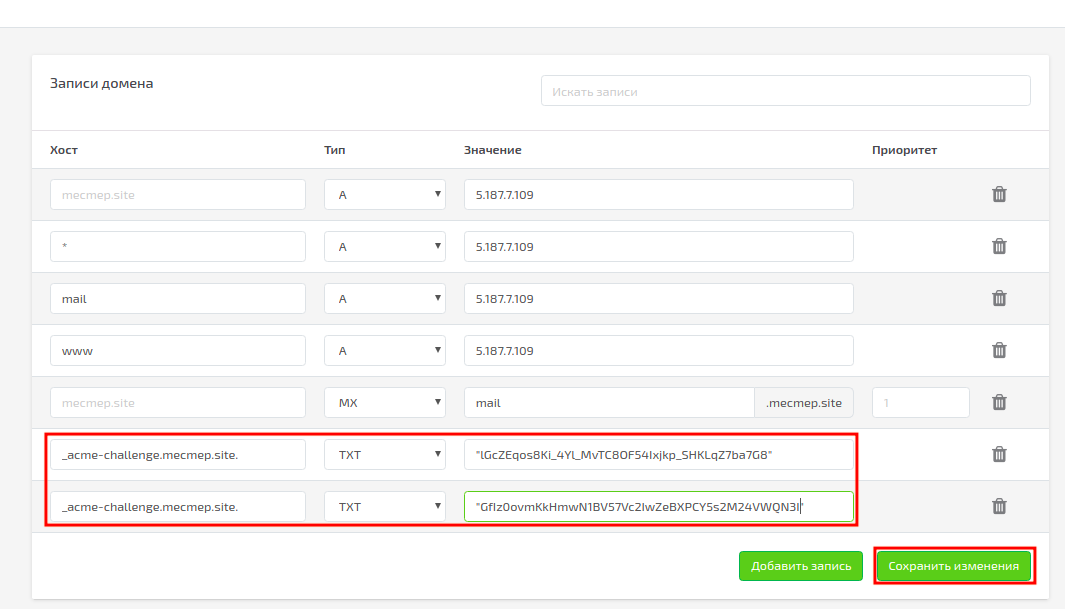
- Verifica che i record DNS siano stati aggiornati
dig txt +short _acme-challenge.mecmep.site
"GfIz0ovmKkHmwN1BV57Vc2IwZeBXPCY5s2M24VWQN3I"
"lGcZEqos8Ki_4Yl_MvTC8OF54Ixjkp_SHKLqZ7ba7G8"- Dopo aver aggiornato il DNS, riprendi l'emissione del certificato:
bash acme.sh --renew -d mecmep.site -d *.mecmep.site --dns --force --yes-I-know-dns-manual-mode-enough-go-ahead-please [Mon Apr 13 14:16:47 MSK 2020] Renew: 'mecmep.site'
[Mon Apr 13 14:16:48 MSK 2020] Multi domain='DNS:mecmep.site,DNS:*.mecmep.site'
[Mon Apr 13 14:16:49 MSK 2020] Getting domain auth token for each domain
[Mon Apr 13 14:16:49 MSK 2020] Verifying: mecmep.site
[Mon Apr 13 14:16:53 MSK 2020] Success
[Mon Apr 13 14:16:53 MSK 2020] Verifying: *.mecmep.site
[Mon Apr 13 14:16:57 MSK 2020] Success
[Mon Apr 13 14:16:57 MSK 2020] Verify finished, start to sign.
[Mon Apr 13 14:16:57 MSK 2020] Lets finalize the order, Le_OrderFinalize: https://acme-v02.api.letsencrypt.org/acme/finalize/83278451/2986784558
[Mon Apr 13 14:16:58 MSK 2020] Download cert, Le_LinkCert: https://acme-v02.api.letsencrypt.org/acme/cert/04445ffc3799e6e4ab158437a6730fb44031
[Mon Apr 13 14:16:59 MSK 2020] Cert success.
-----BEGIN CERTIFICATE-----
MIIFXTCCBEWgAwIBAgISBERf/DeZ5uSrFYQ3pnMPtEAxMA0GCSqGSIb3DQEBCwUA
MEoxCzAJBgNVBAYTAlVTMTMRYwFAYDVQQKEw1MZXQncyBFbmNyeXB0MSMwIQYDVQQD
ExpMZXQncyBFbmNyeXB0IEF1dGhvcml0eSBYMzAeFw0yMDA0MTMxMDE2NThaFw0y
MDA3MTIxMDE2NThaMBYxFDASBgNVBAMTC21lY21lcC5zaXRlMIIBIjANBgqhkiG
9w0BAQEFAAOCAQ8AMIIBCgKCAQEAnF3K+VKC1F1/UBYKdjzzE0QRNa0Du7HzOcuZ
nMOT1TTpsiKIMmwHJMJ9rk1cjn+gWdy+kRxWpFz1giX/tO98GGOU5BvHHEsVW4vN
8JWkWfIA0YYJAEC0vk4iOrUv+HUfjmeHQNKawqKOsnMAAAAFxc0G0qAABAMASDBG
AiEAslEjKLDqUWZ6kX/QDAkFsZ6zbS/qg2zh3QT6duingACIQDY8LijAUZ+Yvfz
olc1F1Y08u3mhbKv1ykI4wMJ5X3dxAB1ALIeBcyLos2KIE6HZvkruYolIGdr2vpw
57JJUy3vi5BeAAABcXNBtpYAAAQDAEYwRAIgJEGmMpNk7pRcLcLwhcmGWIlkJODATc
LDKll/pQ7URhMikCIBo2BVWheYL2XgAuHKNgPic4j5gAmVqBWF9riNKGyH1MA0G
CSqGSIb3DQEBCBCwUAA4IBAQAUwvSV8tNLzrO1/ghDU26y5CNszRouyv8RpMOq1zmO
h6p9UzZlmWULtBQiObTcZAqb3CVsm6F3fU9CbX80uB3yAE1vqjMCkcadIuyAGL+R
EfBG2fQ8WGTRfTylljqz0ctfet/2kWQvWjAtS8P+DeZVbcbO6ubKtHw8SF1bw/v9
s3D13jnxnNJn979+bTQUtVZ8eCcctJfJNHKoe54gC5lF2UlHJTy2SXHtQlG5kw9i
7z/Ag01qItgUBqdKeBZc+tLwfZhXlR46sHn3PTMlPwzuDiEu8TFQKcx6zewzOz1U
tIs5N7XCrdnZsJy0FLG6wJSyszDTldeCLwdWgxPOAEcn
-----END CERTIFICATE-----
[Mon Apr 13 14:16:59 MSK 2020] Your cert is in /root/.acme.sh/mecmep.site/mecmep.site.cer
[Mon Apr 13 14:16:59 MSK 2020] Your cert key is in /root/.acme.sh/mecmep.site/mecmep.site.key
[Mon Apr 13 14:16:59 MSK 2020] The intermediate CA cert is in /root/.acme.sh/mecmep.site/ca.cer
[Mon Apr 13 14:16:59 MSK 2020] And the full chain certs is there: /root/.acme.sh/mecmep.site/fullchain.cer Otterrai così il certificato, la chiave e la chain da inserire nei file di configurazione di Apache e Nginx, sostituendo quelli esistenti:
Apache:
/home/admin/conf/web/mecmep.site.apache2.ssl.conf, dove mecmep.site è il nome del dominio SSLCertificateFile /root/.acme.sh/mecmep.site/mecmep.site.cer
SSLCertificateKeyFile /root/.acme.sh/mecmep.site/mecmep.site.key
SSLCertificateChainFile /root/.acme.sh/mecmep.site/fullchain.cerNginx:
/home/admin/conf/web/mecmep.site.nginx.ssl.conf, dove mecmep.site è il nome del dominio ssl_certificate /root/.acme.sh/mecmep.site/fullchain.cer;
ssl_certificate_key /root/.acme.sh/mecmep.site/mecmep.site.key;- Riavvia Apache e Nginx:
# systemctl restart apache2
# systemctl restart nginx
Per rinnovare i certificati, esegui questo comando dopo 90 giorni e aggiorna il record TXT DNS come indicato di seguito:
acme.sh --issue -d mecmep.site -d *.mecmep.site --dns --force --yes-I-know-dns-manual-mode-enough-go-ahead-pleaseDove mecmep.site è il nome del tuo dominio.

Per aggiornare automaticamente i certificati Let's Encrypt tramite un cron job, aggiungi questo cron giornaliero per il controllo dell'aggiornamento automatico:
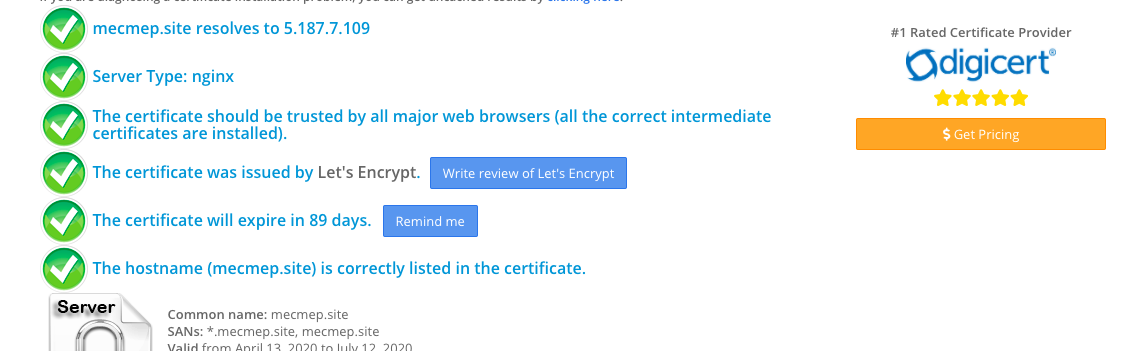
0 0 * * * * * "/root/.acme.sh"/acme.sh --cron --home "/root/.acme.sh" > /dev/nullPuoi verificare che il certificato sia installato correttamente utilizzando questo servizio.
Se hai difficoltà nella configurazione o hai ulteriori domande, puoi contattare il nostro team di supporto tramite il sistema di ticket.